Case Study: Expanding gender options for campers
My role
- UX Lead
My contributions
- User Research
- Expert Interviews
- Facilitating Design Sprints
- Concept Ideation and Design
- Wireframes & Interaction Design
- Prototyping
- User Testing

Overview
CampBrain provides camp management software to day camps, overnight camps, YMCAs, schools and non-for-profits, as well as non-governmental and faith-based organizations. Other than helping these organizations plan, manage and run their business via Back Office (B2B) platform, CampBrain also hosts a Registration platform (B2B2C) where our clients’ clients can log in, enter personal information, and register for camp activities.
Since its first version back in 1994, CampBrain system has collected a person’s gender as male or female, and used that information to match program availability as configured by the client, i.e. if “Canoe Trip” was configured with 8 female spots, only 8 people with female gender were offered a spot, while males didn’t even have an option of choosing it.
The Problem
Given the (gender) binary approach, most North American camps have had for decades with boys and girls cabins, showers, and activities, choosing to base our data model on this duality doesn’t look like an architectural mistake, until we introduce trans and non-binary campers to the mix.
A large number of our own staff were feeling sheepish about this aspect of the software, and the company wanted to be consistent with its own values
Summer camp community is 20k camps strong, well connected, vibrant and vocal about those first day of camp office experiences when a camper doesn’t identify with either option in the rigid male/female dropdown menu – whether the parents know and/or support this or not. The community first started asking each other for advice, and then they turned to the tools they’ve been using to try and find a way to make that camper’s summer the best ever, to make them feel included, just to be met with that same binary dropdown again.
Our passionate client base made it clear that our tools were preventing them from meeting their organizational values, where everyone should feel included.
It became our task to expand the gender collection, and to figure out how to interpret that information when it comes to placing a person into the right programming and cabin without breaking the bank by ripping out one of the core pillars of the software.
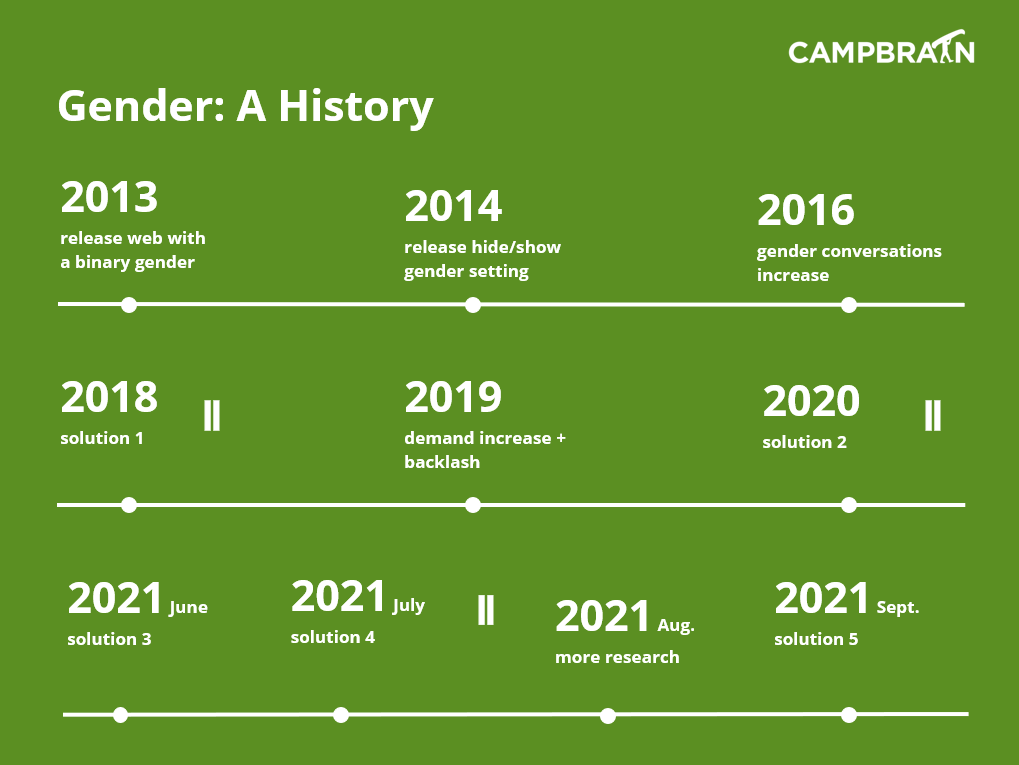
The team failed this task 4 times before finally knocking it out of the park, making this the longest, most expensive, yet proudest design change in the company’s history.
User Research
Due to multiple rounds of discovery and design, I’ll list the total engagement efforts:
- Collaborated with 83 businesses from all segments we serve
- Conducted 37 User Interviews to uncover pre-existing attitudes and beliefs
- Facilitated 4 rounds of Usability Testing to validate designs
Qualitative Interviews
Initial focus was on getting to understand the need of our clients:
- Why is this feature a priority for your organization?
- How would you describe your organization’s philosophy on gender?
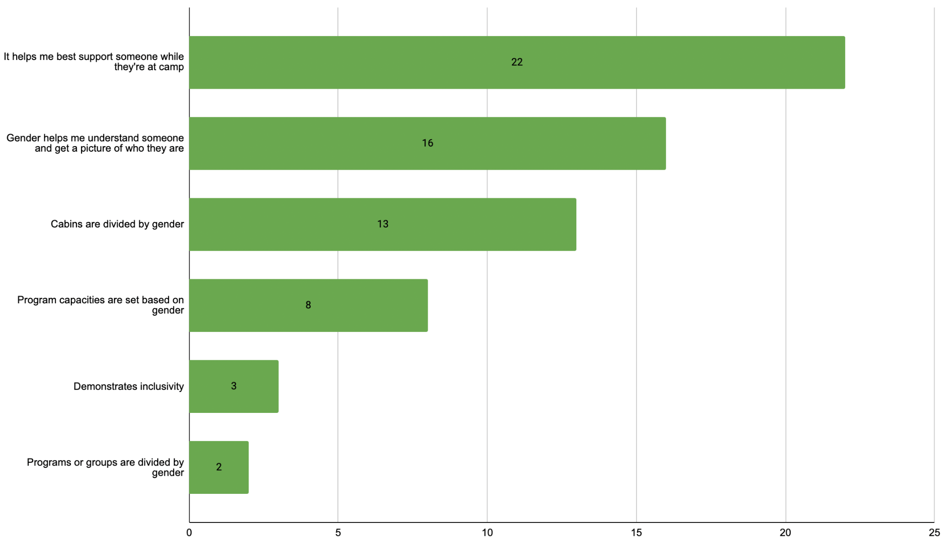
- What are all the things you use gender information for?
- Are there any concerns about how these changes might impact your community?
“Childhood in particular is a time where children are discovering who they are and how they identify. We want them to feel represented, supported, and welcome to our community. We also do not want anyone to feel they are being singled out or a spotlight is being focused on them if they do not identify by traditional binary terms.”
Director of a private school
“We feel particularly called towards radical welcoming of people who’ve been traditionally and historically excluded from churches and told they were not worthy of God’s love.”
Leader of a faith-based organization
“I have no concerns about adding these options. I do have concerns about not adding them. We want our community to know this is a safe and welcoming place.”
One of our YMCA clients
“I think this can only be a good thing for us. We may have some families who are unwilling to open their minds to gender inclusivity, but those will hopefully but minimal.”
A faith-based client
“I am much more concerned about the individuals at camps who have been asked to lie, hide, or feel shame about who they are than I am about the minor inconveniences or logistical issues it will create for us as a camp. In general, our customers have been very supportive of these changes and our registration numbers have only increased as we have become more inclusive.”
Director of an overnight camp
Further research included:
- DEI expert, who also used to be a summer camp director, to understand both best practices and microaggressions that collecting gender-related information can produce, and to later help with crafting our UI copy
- Consulting agency that specializes in making spaces safe and inclusive for trans and non-gender conforming individuals, to train our entire company first before engaging with this community
- Our clients’ potential customers – trans, non-binary and GNC individuals or their parents, who are registering themselves or their children for camp, to hear first-hand about their experiences with providing gender-related information in registration forms
Findings
We needed to:
- Support all of our clients and their different approaches to collecting gender information
- Provide flexible options for clients to collect gender information in a way that reflects their values and is welcoming to everyone in their community
- Come up with a solution in a reasonable size effort wise to implement, and one that is easy to understand and use.
The needs we heard from the clients allowed us to run a card sorting exercise and identify 4 categories:
Client 1
No gender
We don’t need to collect any gender information or we don’t want to collect it.
Client 2
Binary gender
A binary choice of male/female works well for our organization and no changes are required in the foreseeable future.
Client 3:
Gender for registration purposes
We have gender capacities or divide cabins/programs by gender, but we want to ask for gender information in a more flexible way.
Client 4
Gender for reporting purposes
We don’t have gender capacities or divide cabins/programs by gender, but we want to ask for gender information in a more flexible way.
Personas/User Profiles
Every failed design meant going back to the drawing board and adding another Persona to the solution.
Camp Director “Stay”
office user
- wants status quo, male/female is still the best option
- does not want to use any of the new features
- wants no effort, no action items on the rollout day
- is not offended by seeing these settings in the system
Camp Director “Drop”
office user
- does not want or need gender information at all
- might ask for pronouns
- is OK with some effort to disable collection of gender
- might want to hide mention of gender altogether
Camp Director “Move”
office user
- wants to ask for gender in a grouping context
- wants to ask for pronouns, both campers and parents/guardians
- is OK with medium effort to get the new setup and wording right
- might need gender information for other reasons
Registrant “Green”
public user
- from the trans, non-binary or GNC community
- is OK with providing gender in a grouping context
- wants to share pronouns
- can be self-registering or via proxy (guardian/parent)
Registrant “Orange”
public user
- cis-gender, self-registering individual or proxy (guardian/parent)
- feels OK or indifferent to providing gender in a grouping context
- shares pronouns, skips sharing, or enters irrelevant info in the field
Registrant “Red”
public user
- cis-gender, self-registering individual or proxy (guardian/parent)
- doesn’t like or is confused by providing gender in a grouping context
- doesn’t share pronouns, or enters irrelevant info in the field
Concepts
Solutions ranged from mapping a configurable list of gender identities to person gender, to classifying gender as seasonal information, to the final concept where gender information can be repurposed, wrapped in a contextual question to determine with whom the person would feel most comfortable.
We don’t need to ask for gender in order to determine where to assign a person; instead we skip the interpretation part and ask that question directly, in the context of programming and bunking.
Ideation
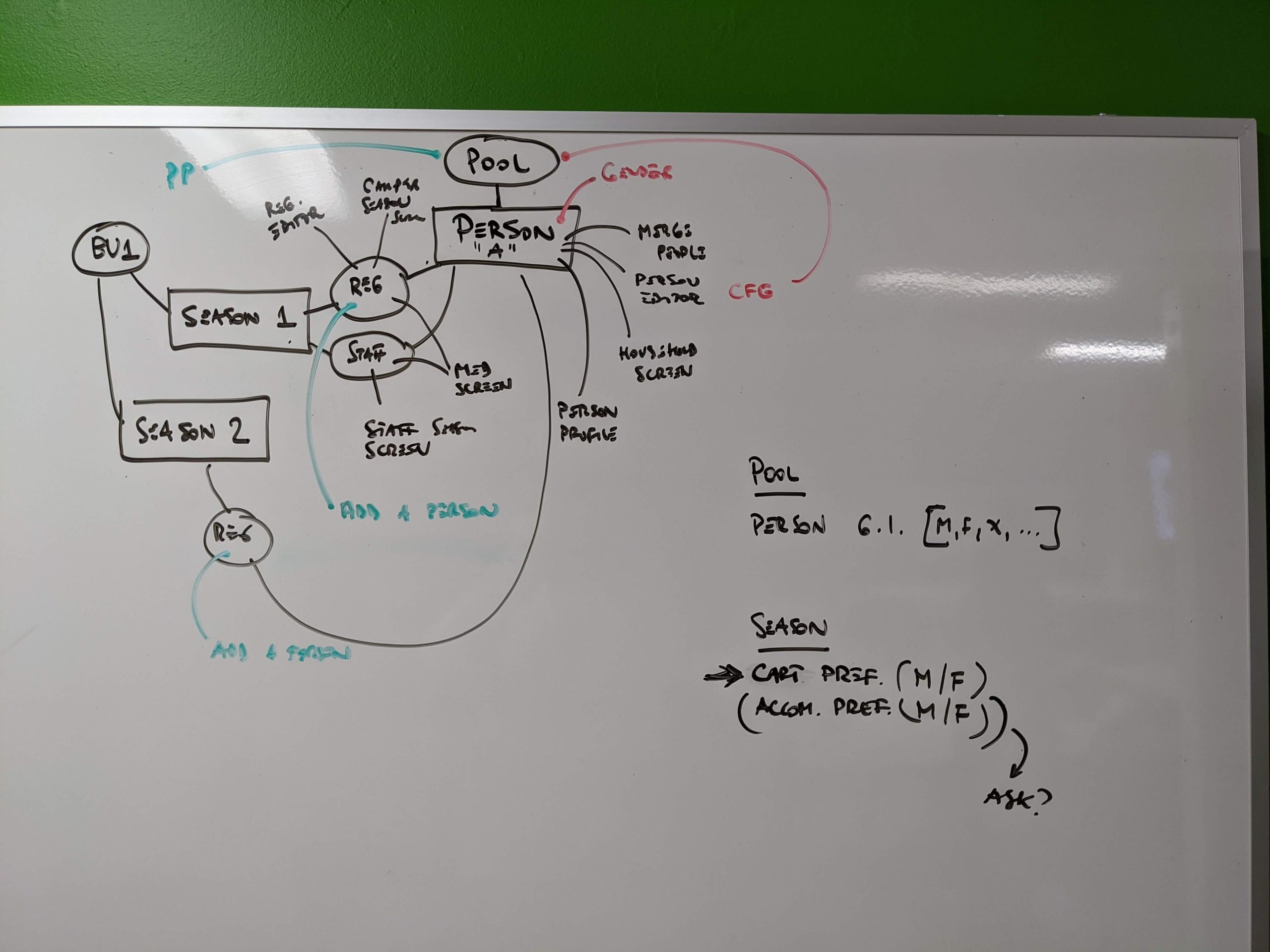
This stage is a combination of different methodologies, where I present the challenges, introduce empathy, and facilitate workshops with a multidisciplinary team, where potential solutions are scrutinized and roadblocks identified while still at high level.
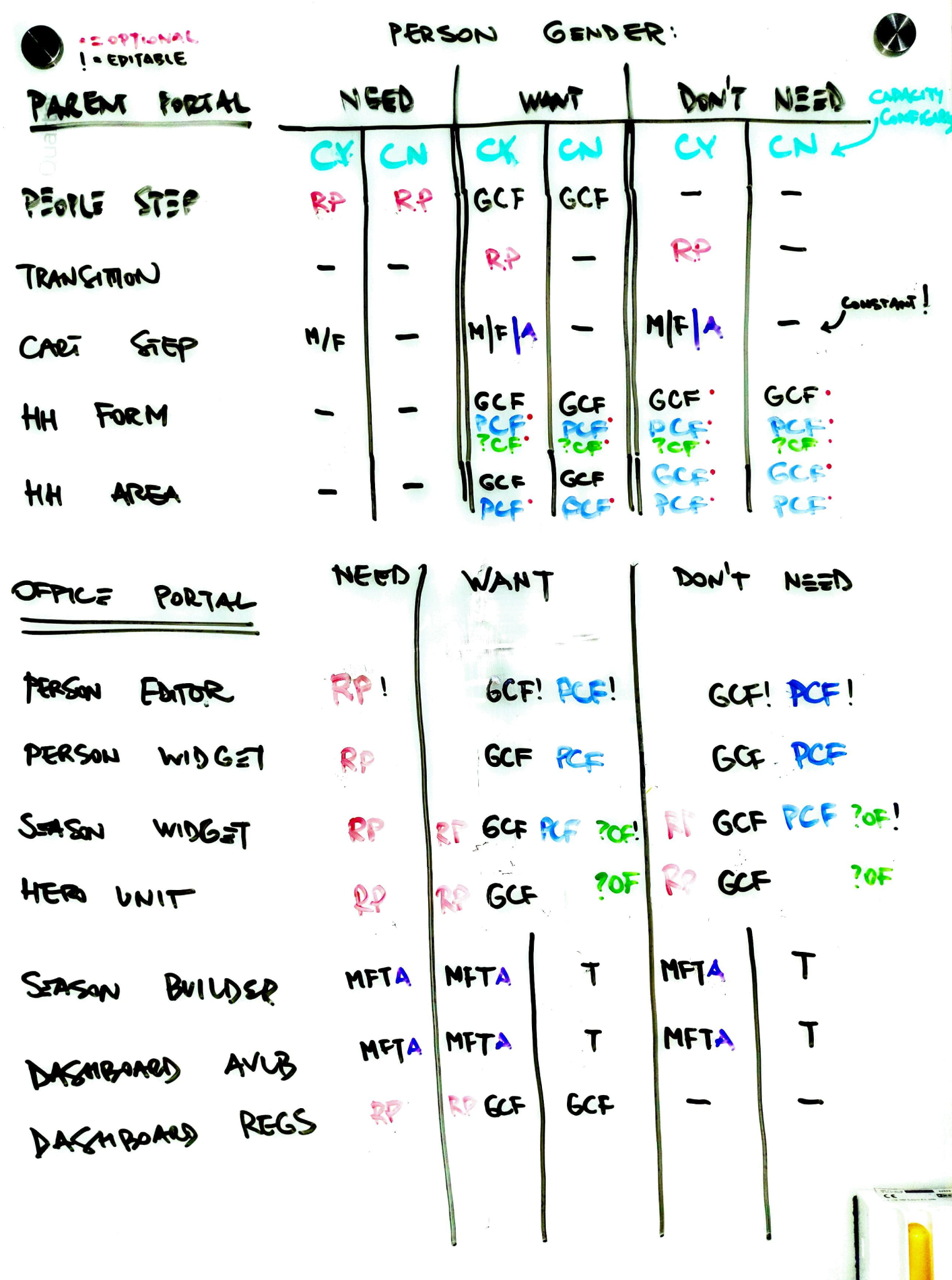
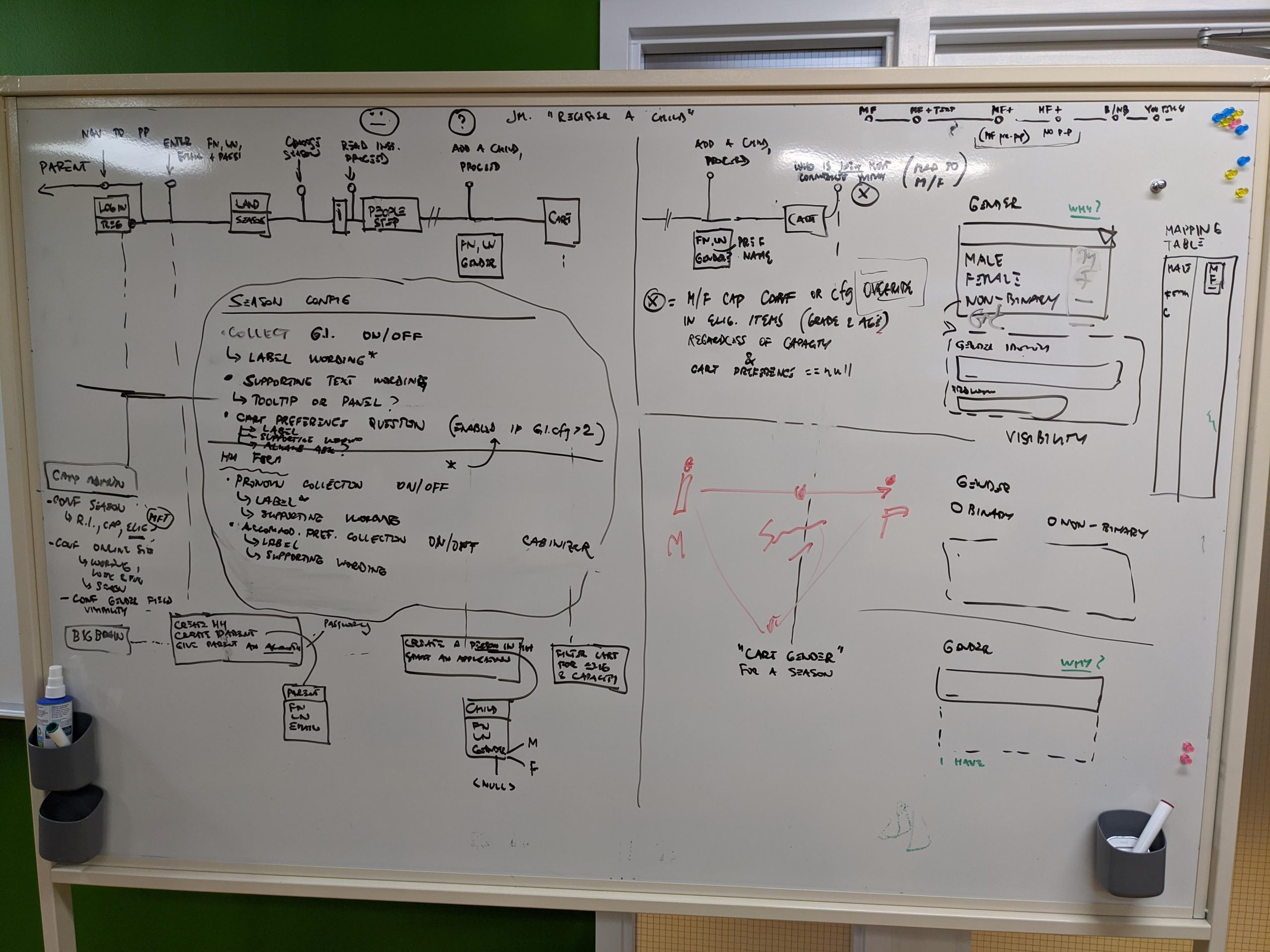
Frameworking
Once one or two solutions are identified as acceptable by the Architect, Devs and QA, it becomes UX team’s task to take all user stories, identify every required functionality, and push them through those solutions and define end-to-end experiences for every scenario. We named this process Frameworking, because it produces a framework that is easy to present, understand, and follow along, and it allows the team to point at a certain area and discuss issues in context.
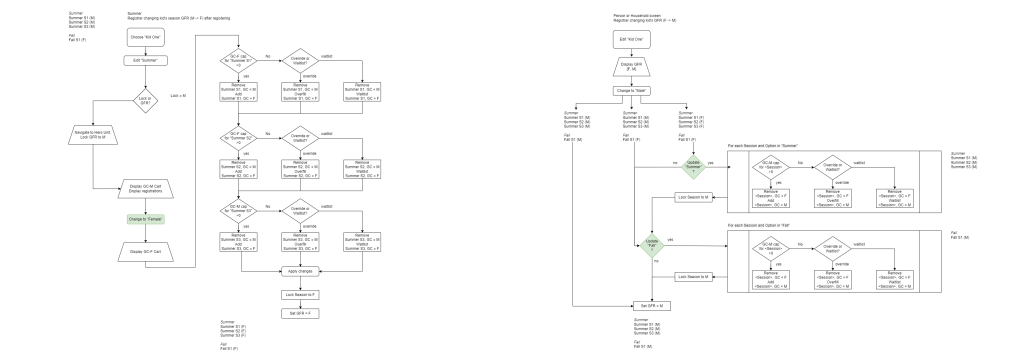
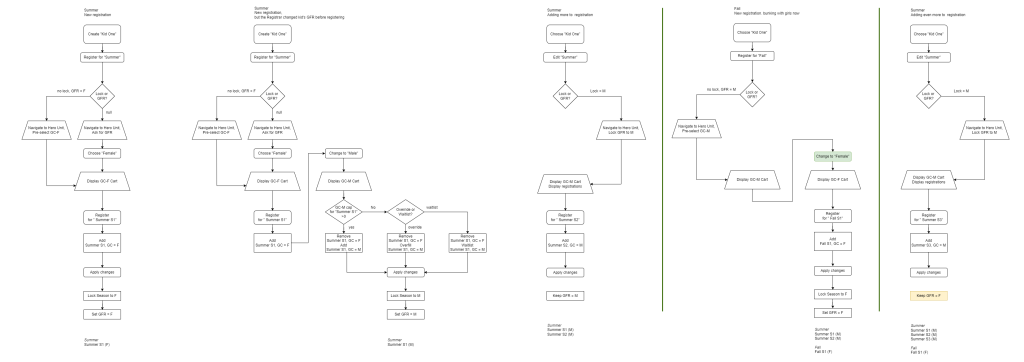
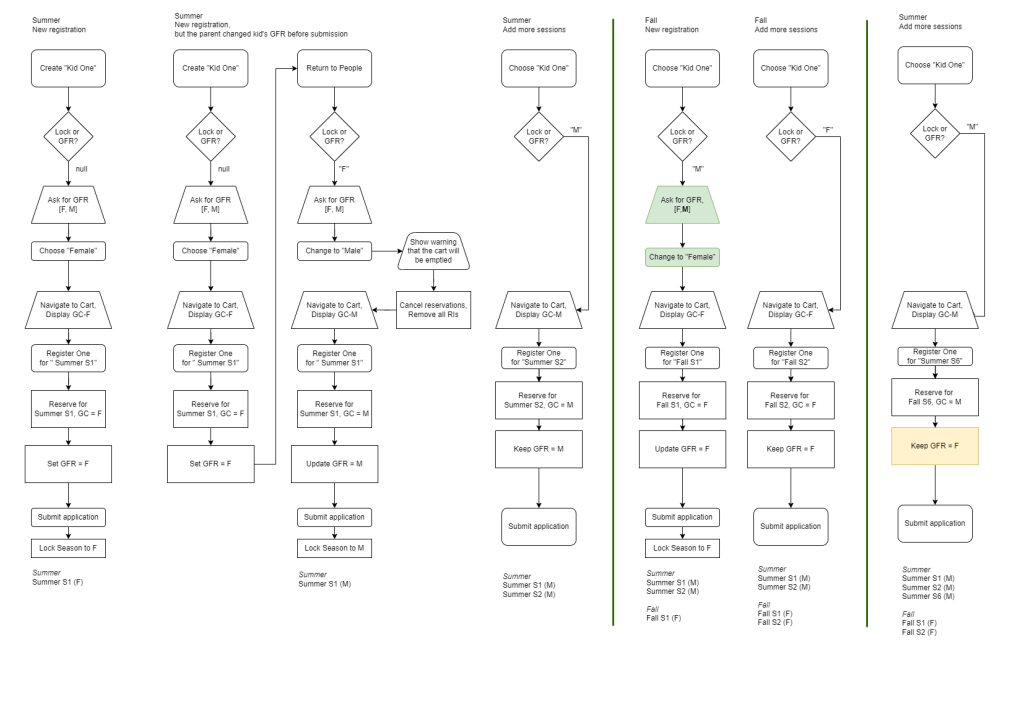
Once adopted, a feature list is created for the Dev to estimate effort, and the features can be bundled up into “solving packages” in Sprint Zero, where fleshing out all the nitty gritty happens before writing specs takes place, and the first UIs are made.
Solution
Full configurational flexibility was achieved with minimal changes to our data model and business logic; we were still able to help clients manage capacities, but the communication and experience was vastly improved.
There’s almost never a good reason to ask someone for their gender in a web form. If you do, make sure to explain why, where and who will be using it.
DEI Consultant
This became our North Star, and it guided us to the best possible solution.
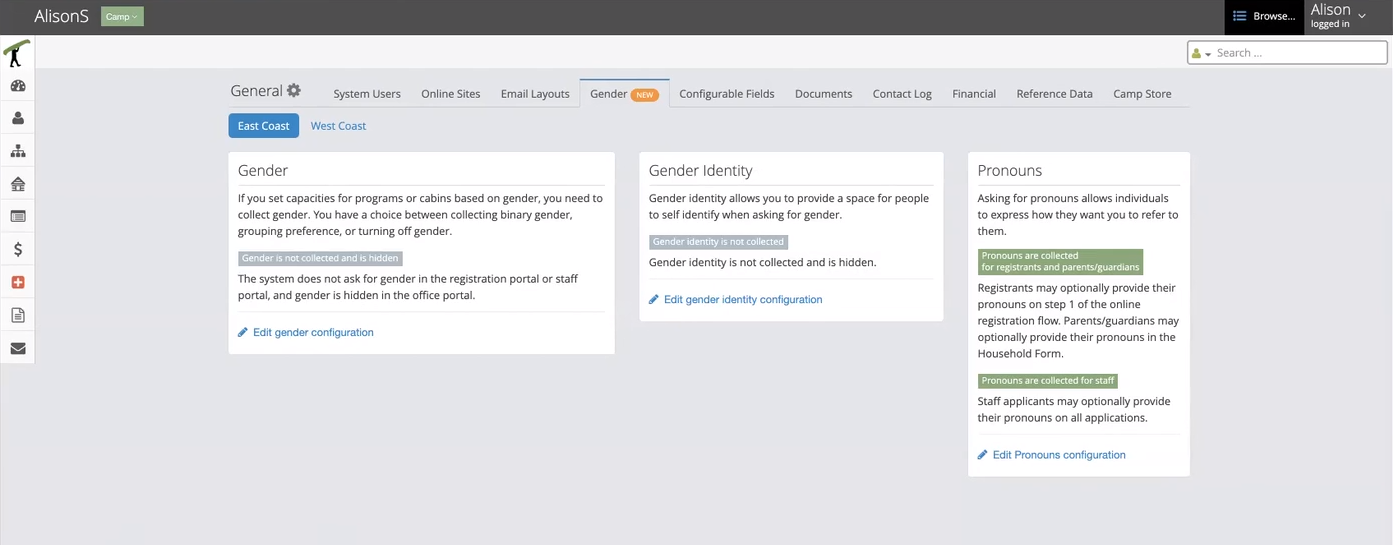
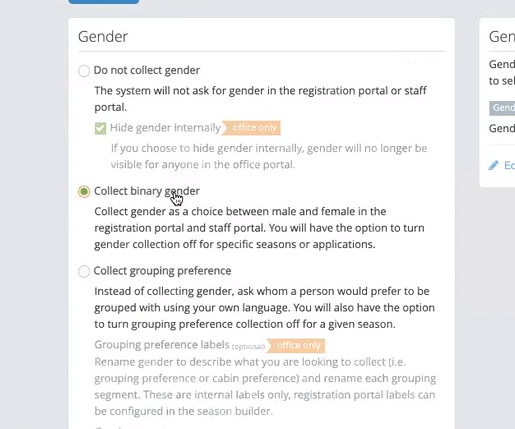
Option 1: Don’t collect gender
- This option is for those who don’t need or want to ask for gender for any of your programs, you don’t set program capacities based on gender, and you don’t group or assign cabins or housing based on gender.
- If they choose to not collect gender, the system will remove gender from the registration process and any staff applications
- They also have the option to remove gender throughout the rest of the software and on reports
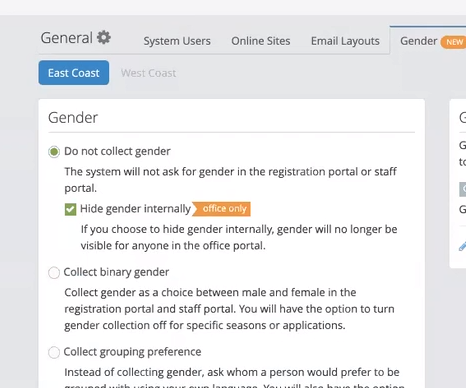
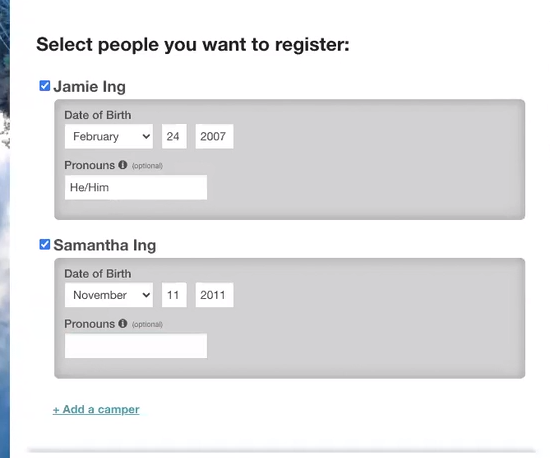
Option 2: Collect binary gender
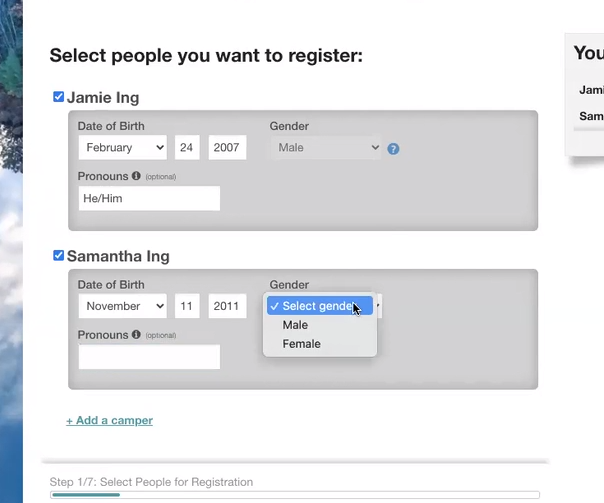
- This option is for those who want to collect gender and are looking for the options to be male and female.
- If they choose this option, the system will ask for gender as part of the registration process and the choices will be male and female
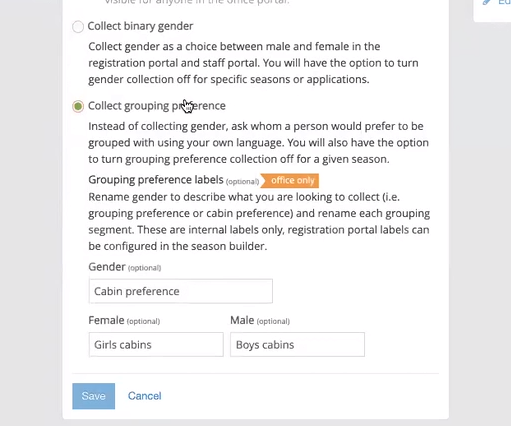
Option 3: Collect grouping preference
- This option is for those who set program capacities based on gender, who group or assign cabins or housing based on gender, AND who are looking to collect this information in a more flexible way
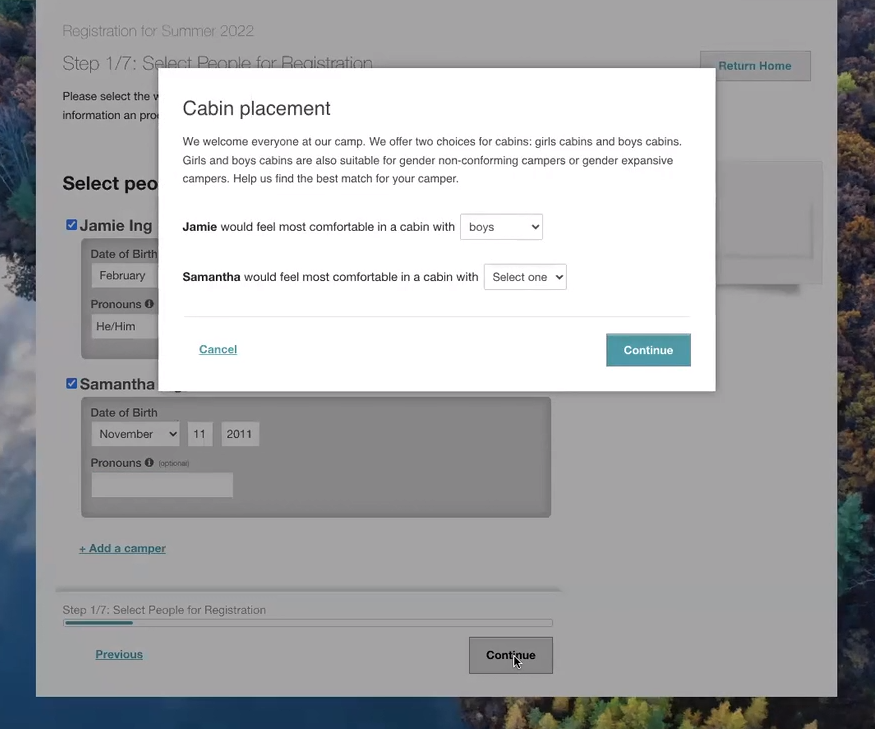
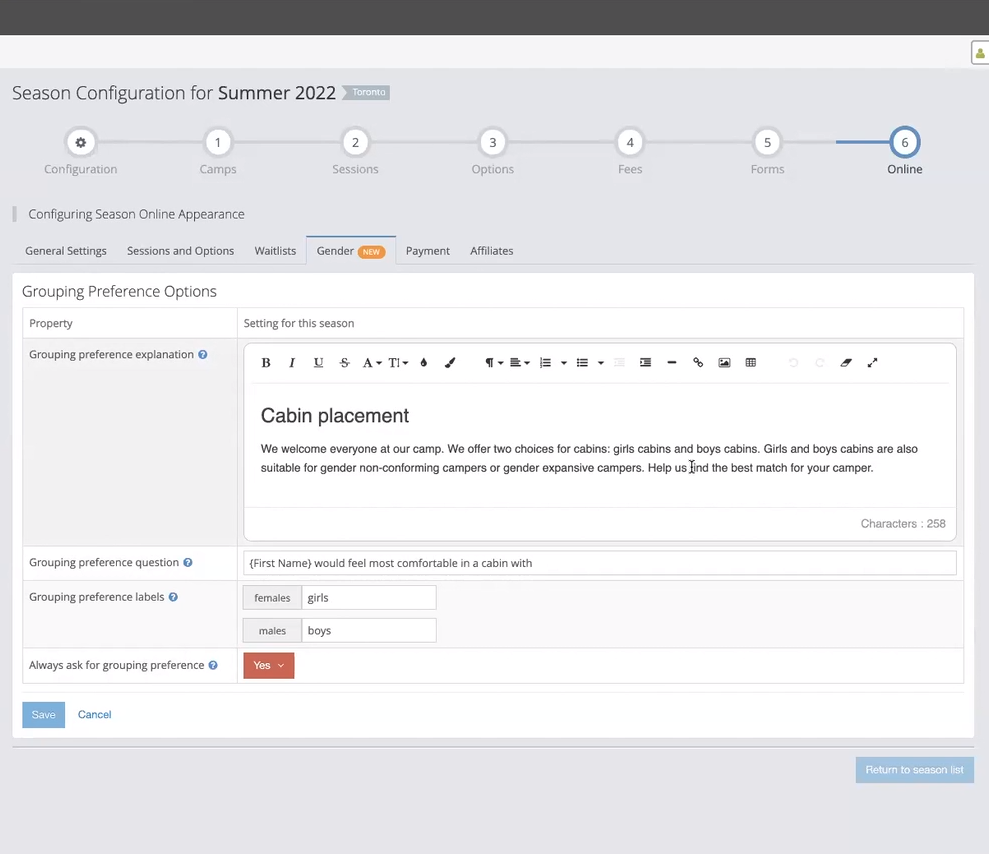
- If they choose this option, during registration instead of asking for gender, the system will ask who are you most comfortable being grouped with? They can position this question and the two options in their own words based on their policies and values.
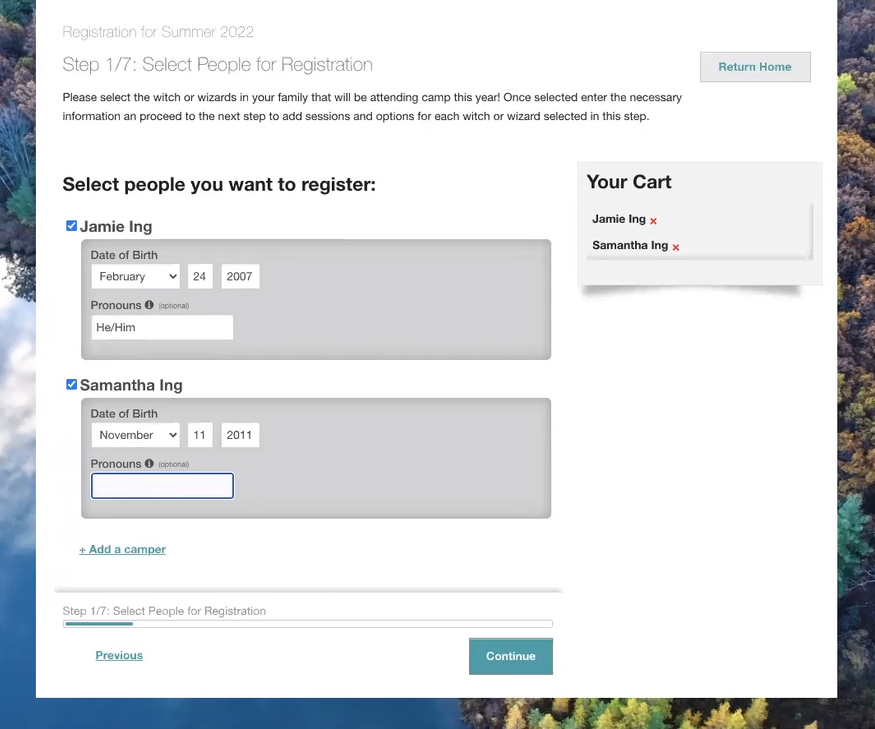
- In the registration portal, we’ve removed gender but when registrants want to proceed, they’ll be presented with a modal screen, and the system will ask for grouping preference. In this example, we’re asking who they want to be in a cabin with. At this point, there are only 2 options to choose from but all of the wording on this screen can be customized. System uses the choice selected here to enforce program capacities, eligibility, and help with cabin placement.
- Unless overridden with “Always ask”, the system was designed to look ahead into what each person would be eligible for, and ask this question only if there are gender capacities configured for registration items.
Testing
As mentioned before, many concepts were tested throughout the process – concept testing, A/B testing, and Thinking Aloud testing with a small, but representative group of clients, and internally with department heads – but for the final one:
- a functional hi-fi prototype of the registration site was built, in order to run
- a moderated usability test completed by parents of or individuals who are trans and/or nonbinary, and well as
- a non-moderated remote user testing, to test the general population’s reaction to non-binary gender options.
- A subset of clients who got invited to beta testing provided positive feedback, as well as some recommendations for wording and instructions in configuration.
Impact
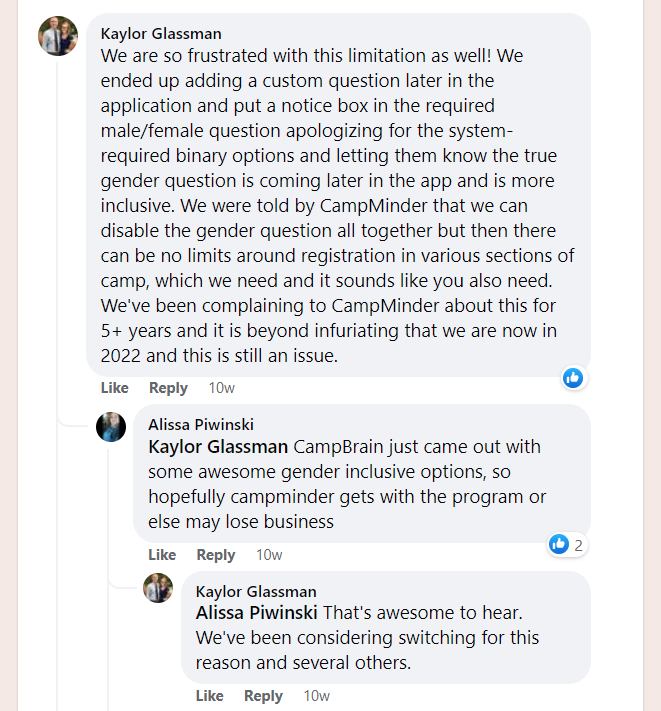
Immediately after releasing Expanded Gender we got praise in emails, on the phone from the clients, and the feature adoption rate confirmed that. Some even took that praise online:
Perhaps one of my favourite pieces of feedback came from the pronouns field in our UI, where one camper wrote in “they/them (THANK YOU FOR ASKING!!!)“.
Internally, we had team members voice their pride both in the fact that the company took this head on, and how deceivingly simple, yet flexible the solution ended up being.
I was honoured to present this journey in my talk at the uXperience conference in February 2022.
Retrospective
This feature research and design came with a lot of lessons, which was surprising for a well-trained team that’s been building the software from the ground up together for ten years.
Do not ignore your beliefs.
We knew back in 2012 that binary gender will not suffice in the future. Architecting a system to be based on these temporary pillars was something that never should have happened, because the price tag for fixing it grew with every line of our source code.
Know your audience.
The customer is not always the user. While the research indicated that the need existed in the B2B space, we actually needed to include and consult the audience from the B2B2C in order to understand the problem and figure out the solution.
Ask for help.
We are not the experts in this field, and there’s a tremendous difference between knowledge and experience, one being that you cannot learn experience. Knowing when you’re out of your depth and reaching out to experts and believing them is key here.
Trust the process, but not blindly.
There’s comfort in what we know, in what worked so far, in the very process you’ve been honing for years. But it also builds complacency, and it blinds you from noticing that something is different, new.
Questioning the process can be the first step of that process to determine if it still applies, or if any new factors have comeinto play, and whether a slight course correction is needed.